
Build and serve storefront menus with Trees
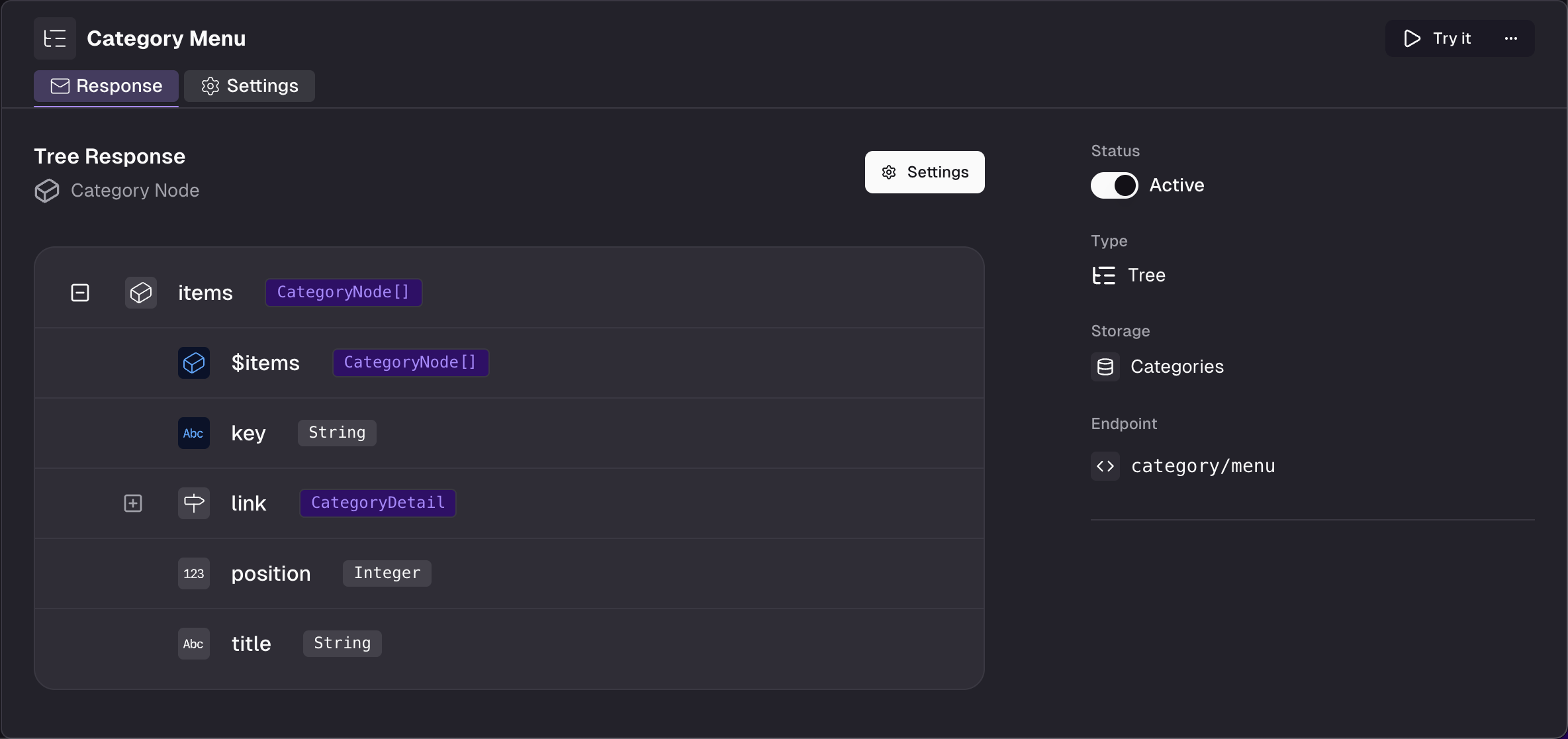
Have you ever wondered how you should handle multi-level navigation menus with Frontic? You don’t need to wonder anymore - with Trees you can manage hierarchical records with ease!
To enable tree management, we have introduced to new default fields to your storages: position and parentKey. If you already had created those, they’re still right there.
If you map a record’s parent record identifier to parentKey, Frontic will pick that up for a hierarchical structure and can give you the full picture in one request.
In your Frontic project’s Builder, you can now create Trees, alongside Blocks, Listings and Pages. Trees work similar to Listings, in that you’ll choose an existing Block for the API structure. Frontic will automatically add additional $items nodes to the Tree’s response schema with all the child records.
If you’ve created a Tree, you’ll need to regenerate your Client SDK with Frontic’s CLI. Then you can use the new client.tree() method to fetch your Tree.
You can optionally pass a key query parameter to choose a different starting point than “from the top” (e.g. for a sub-menu).
If you just need a couple of levels (e.g. 2 for a main navigation menu), you can use a depth query parameter to limit the returned structure.
We limit a Tree’s records to a maximum of 250 items. We sincerely hope that’s good for all your navigational needs - but still, talk to us if your use case needs just a little bit more to take off.
Product updates in your inbox, roughly once a week, never more.
Unsubscribe any time, one click.